-

Klicken GO um das Setup-Handbuch anzeigen
-
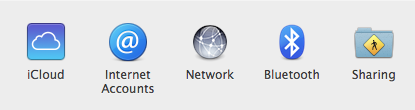
Open your System Preferences
-
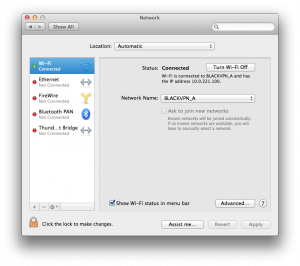
Wählen Network
-
Click the lock icon to make changes (if required).
-
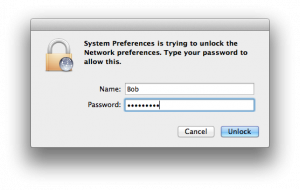
Enter your OS X username and password.
Klicken Unlock to continue
-
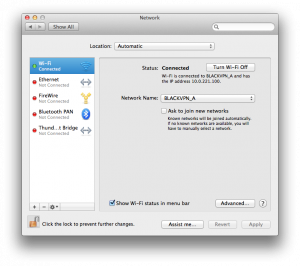
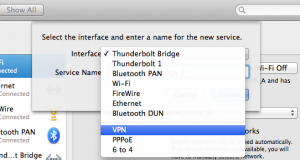
Click on the + symbol to add a new connection.
-
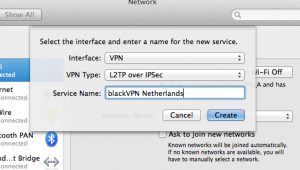
Change the Interface to VPN
-
Verify the VPN Type is L2TP over IPSec.
Enter a name for this VPN connection.
Klicken Create.
-
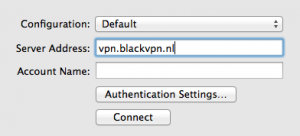
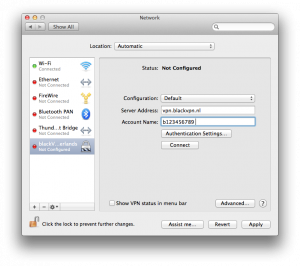
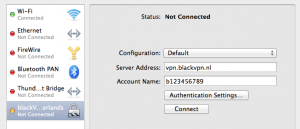
Enter the VPN Server Address you choose.
CANADA: ca.vpn.blackvpn.com
ESTONIA: vpn.blackvpn.ee
LITUANIA: vpn.blackvpn.lt
LUXEMBOURG: vpn.blackvpn.lu
NETHERLANDS: vpn.blackvpn.nl
PANAMA: vpn.blackvpn.com.pa
RUSSIA: vpn.blackvpn.ru
SWITZERLAND: vpn.blackvpn.ch
SINGAPORE: vpn.blackvpn.sg
UKRAINE: vpn.blackvpn.com.ua
Vereinigtes Königreich: vpn.blackvpn.co.uk
USA EAST: eastcoast.vpn.blackvpn.com
USA WEST: westcoast.vpn.blackvpn.com
-
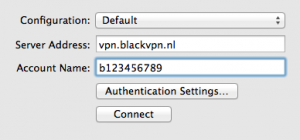
Enter your blackVPN username
in the Account Name box.
Klicken Authentication Settings...
-
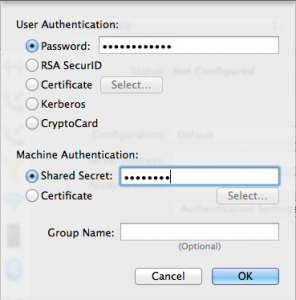
Enter your blackVPN Password.
Enter Shared Secret: blackvpn
Klicken Ok.
-
Click on Erweiterte ...
-
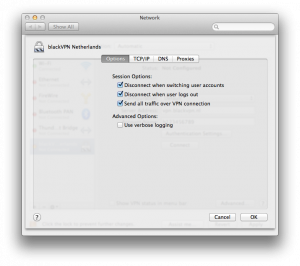
Turn ON Send all traffic over VPN connection
Klicken Ok.
-
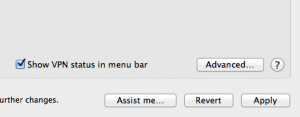
Turn ON Show VPN status in menu bar.
Klicken Apply
-
Your VPN connection is now ready.
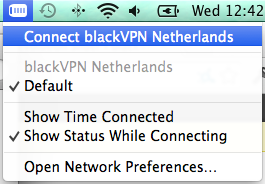
Klicken Verbinden to connect to the VPN...
... or connect from the toolbar.
-
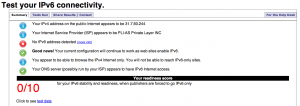
Besuchen Sie
Test-ipv6.com
If you have an IPv6 address detected
Sie müssen / du musst
Sie AUS IPv6 Konnektivität.
-
Connection issues?
Visit our IPSec FAQ zu
fix most issues (
check your firewall or router).
Still stuck?
Contact our Support Team.